For brains that forget, get overwhelmed
or just need things to be simple
You can finish three things.
You can’t finish twelve.
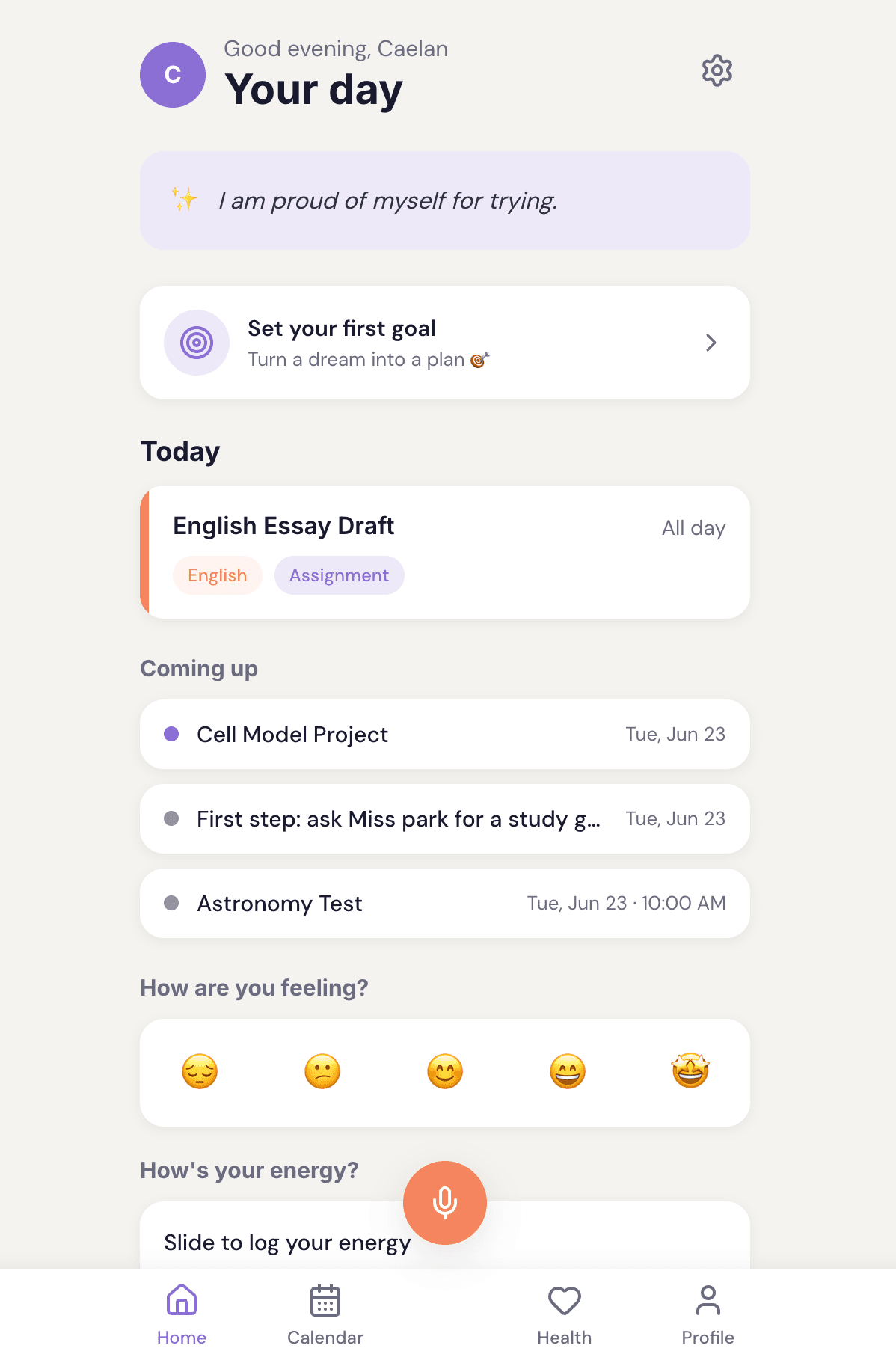
Zella is the planner you can’t fall behind on. Pick the three things that matter today. Everything else waits, quietly, until you’re ready. Nothing goes red. Nothing keeps score.
Works on any phone. Installs in 30 seconds. No app store.
Every planner you’ve tried became one more thing you failed at.
The blank pages. The broken streak. The list that never got shorter. It stops being a tool and starts being evidence against you.
Zella is built so that can’t happen. Miss a day and nothing breaks. Come back and it’s just there, no catching up, no guilt. A soft place to land for a brain running a hundred tabs.
In their words
I like that it gives me something to accomplish throughout the day. Even if I don't have much going on, I feel like I've actually done something. Honestly, I feel less anxious since I started using it.
Three things. That’s the whole idea.
You pick them
The night before or first thing in the morning, choose the three that matter. Not twelve. Three.
Everything else is parked, not gone
Your goals and to-dos are still there, held safely out of sight, so today only shows what you can actually do.
Finish one and it's a real win
No streak to protect, no counter ticking down. Just proof you did something today.
Built on executive function
Staying organized, starting a task, keeping track of time, managing big feelings. These are executive function skills and they don't come automatically for every brain. ADHD, dyslexia and anxiety all shape how they work. Zella was built to support them: capturing what you'd forget, breaking big goals into doable steps, protecting focus and offering a calm reset when things feel like too much. Not a planner bolted onto a wellness app. One tool, built for how your brain actually works.
Voice capture
The thought’s gone by the time you unlock your phone. Just say it.
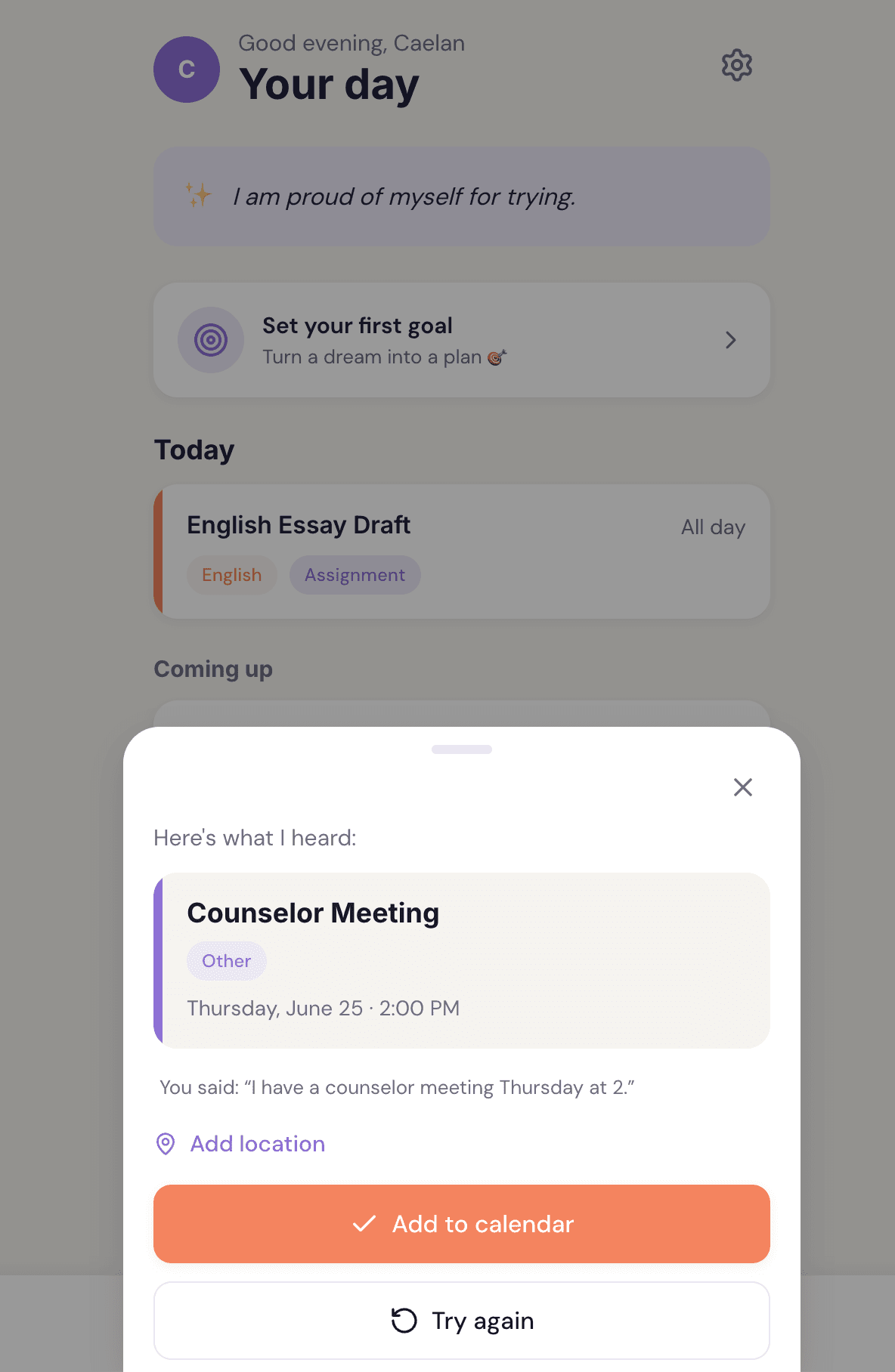
Tap the mic
One big button. No typing, no menus.
Say what's due
“English essay Monday,” “Math test next Thursday at 10.”
It's on your calendar
Color-coded to the right class, ready to go.
Added a test?
Zella asks if you want to block study time too. One tap.
Read aloud
Hear any event or note read back to you. Built specifically for brains that process better by listening than reading.
Daily habits
Build a habit at your own pace. Miss a day and nothing breaks. Come back and it's just there, no streak to protect.
Daily affirmation
Start every day with a warm, steadying affirmation. A quiet moment for yourself before anything else.
Goals in small steps
Break a big goal into small steps, name what usually gets in the way, then make a simple if-then plan for it.
Connect your school
Bring your whole semester in with one link.
Paste a link from Canvas, Blackboard or any school calendar. Your classes and due dates land on your calendar, color-coded, in one go. New assignment posted? It shows up on its own. A due date moves? Zella moves it too. You never re-import anything.
Paste one link
Copy your calendar link from Canvas, Blackboard or any tool that gives you one. Paste it in once.
Your semester lands
Every class and due date shows up color-coded, grouped by class, ready to go.
It stays current
Zella re-checks your feed on its own, so new and moved assignments just appear. No busywork.
Want it in the calendar you already check? Turn on phone sync and your Zella schedule shows up right inside your phone’s own calendar app.
Not in school? You can import any calendar link the same way.
See it for yourself.
A look inside the app.
This week
Big 3 · 2 of 3 todayM
T
🩸
W
T
F
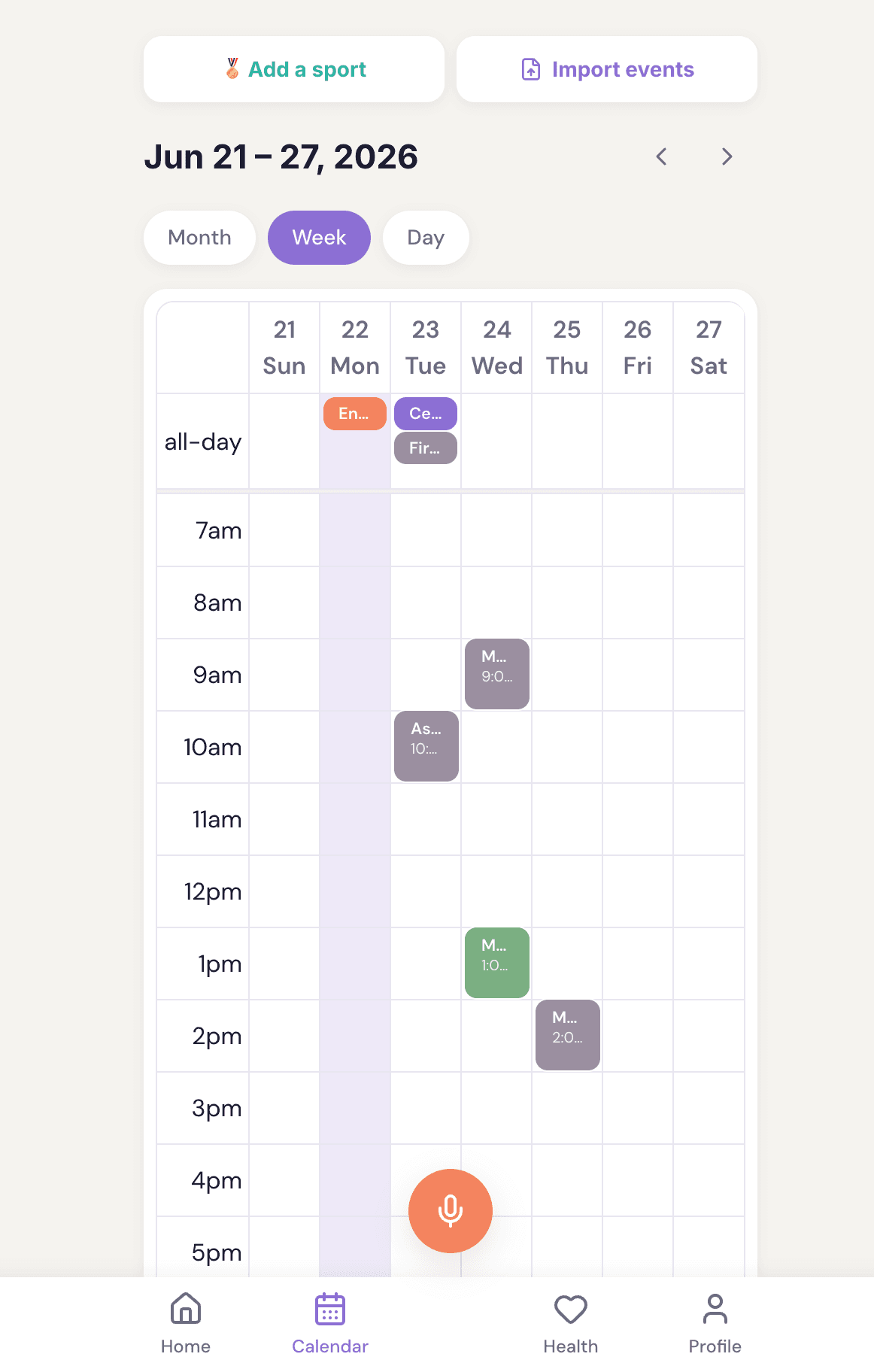
Your whole week at a glance.
Color-coded classes, gentle health icons, everything in one calm view.
Your plan · step 8
Name the one thing most likely to get in your way.
Your if-then plan
🔬 Naming the obstacle and making an if-then plan can roughly double follow-through.
Goals that actually stick.
Step-by-step coaching, your obstacle named, your if-then plan ready.
Private, on your device
Next period in
12 days
Never sent to a server. Never visible to parents or schools.
A gentle daily check-in.
Mood and energy, plus a private period and headache log. Not one more thing to track. Mood and energy never leave your device. Period and headache stay too, apart from a simple yes/no summary you can choose to share with a parent.
Everything inside Zella
Plan
- Tap the mic and your words become a calendar event instantly. Add a test and Zella offers to block study time too.
- Paste a Canvas, Blackboard or any calendar link and your whole semester imports color-coded, then stays current on its own
- See your Zella schedule inside your phone's own calendar app
- Upload a school calendar, paste a group chat or share a webpage and Zella adds all the events at once
- Gentle check-ins before tests, study blocks and goal milestones. Warm, never keeping score.
- Week, month and day views with your class colors
- Passed a test or class? It quietly marks itself done. No action needed.
- Unfinished assignment? It reappears the next day as a gentle nudge, not a red alarm.
Grow
- MCII goal coaching, picture the work, name the obstacle and make your if-then plan
- Daily visualization practice, a short mental rehearsal of the outcome and your next step
- A guided four-phase meditation, built to calm a busy brain. Choose 12 or 20 minutes.
- Daily habits that never punish a missed day
- Schedule your first step right onto the calendar
- A warm daily affirmation to open your day
- Set your Daily Big 3, the three things that matter most today. If nothing else gets done, these will.
Feel
- A gentle daily check-in, one-tap mood and a 1 to 10 energy slider. Not one more thing to track.
- Health icons on your calendar to spot patterns
- Private period tracker with cycle predictions, symptoms and notes
- Understand how your cycle affects your energy and focus. Zella shows you what phase you are in and what that typically means for your week
- Private headache tracker with triggers, sleep, food, stress and what helped
- Generate and download a health report to share with your doctor or a parent when you choose
Play
- Set up your whole sports season in one guided flow, practice days, game days, home and away, pre-season prep, all on your calendar at once
- Games marked separately with home or away
- Pre-season prep blocks added automatically two weeks before your season starts
- Each sport gets its own color and emoji
Trust
- Parent view is read-only, never your mood or private health details
- Age check at signup, under-13 blocked
- Your profile, your colors, your classes
What's private stays private.
Your mood and energy never leave your device. Your period and headache tracking stays there too, never on a Zella server. We can't see it and neither can anyone else. It's yours to back up or delete whenever you want. The only thing that can ever be shared is a simple yes/no weekly summary of period and headache days, shared only if you choose to turn it on.
In college? Bring the whole semester in at once.
Five classes, five syllabi, dozens of due dates buried in PDFs. Drop a syllabus in and Zella pulls the deadlines, exams and readings out for you to confirm. Paste your Canvas or Blackboard link and the whole term lands on your calendar, color-coded by class. It stays current as your professors add things. Miss something? It carries forward to the next day, quietly, instead of turning red. No parent portal, no busywork. It’s your schedule, your way.
Built for both of you
Finally, a planner that works the way your brain does.
- Your Daily Big 3, the three things that matter today. Everything else waits.
- Your voice becomes your plan in seconds
- Missed things move forward quietly, no shame
- Mood and energy tracked privately, your data only
- Health info is never shared without your permission. You control it, always
- Color-code your classes and make it yours
- Paste your Canvas, Blackboard or any school calendar link and your whole semester lands, color-coded and current
- See your whole schedule inside your phone's own calendar app
- A morning affirmation, daily habits that never punish a missed day, no lectures
- Set up your whole sports season in one guided flow, practices, games and pre-season, all on your calendar at once
Support without hovering.
- A read-only academic view when your teen shares it, so you see what's due and done
- You never see mood or energy, ever
- Fewer homework battles, they're already organized
- Calendar and a weekly health summary are two separate switches. Your teen turns each on or off independently, anytime
- Age check at signup, under-13 blocked (COPPA-aligned)
- Set up in minutes, no daily involvement needed
- Students can generate a health report to share with a doctor when they choose. You never see it unless they share it
Your teen can share their academic calendar, a weekly health summary, both or neither, completely on their terms.
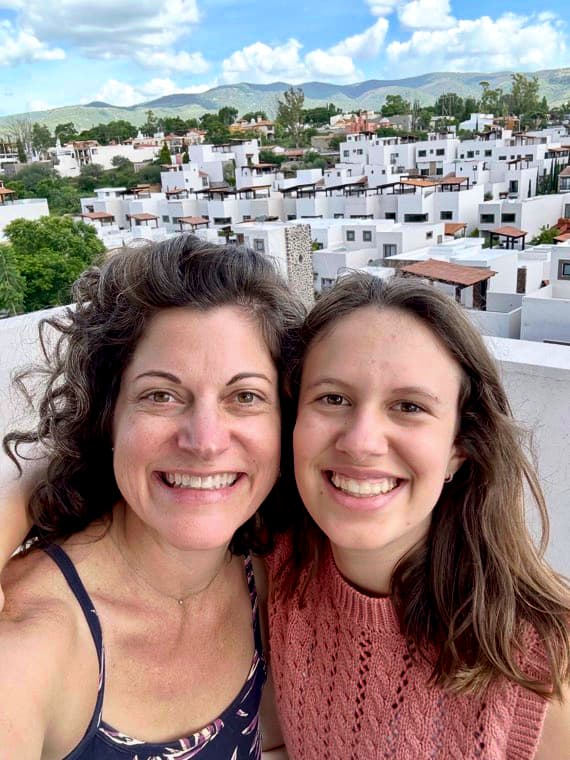
Why Zella exists
I asked my daughter what would actually help her start high school.
She's dyslexic and has ADHD. Paper planners don't work when you can't read your own handwriting. She knew what she needed to do. She just couldn't hold it all at once.
So we built something that listens instead of making her type. Something uplifting, not just a to-do list. Something that keeps her health data completely private. Her body, her information. Something that teaches her to break big goals into small steps.
We built it for her. Then we realized how many families needed exactly this.
Welcome to the Zella family.
Rachel Buchanan, Co-Founder of Zella
Mama to Caelan, my greatest teacher. I'm still learning every day.
Zella was co-founded with Caelan Buchanan, 9th grade, the teenager who inspired every feature in this app.
Questions? We’ve got you.
Do I need to download it from the App Store?
Nope. Zella works right in your browser and installs to your phone in about 30 seconds. Open the site, tap “Add to Home Screen” and it lives on your phone like any other app. No app store needed.
Is Zella really free?
Yes. Zella is free right now while we build it with early users. When paid plans arrive, founding members lock in a lifetime rate and we'll say it plainly before anything changes.
Does it work with Canvas or Blackboard?
Yes. Paste the calendar link from Canvas, Blackboard or any tool that gives you an iCal link. Your whole semester lands on your calendar, color-coded by class. It refreshes on its own, so new and moved assignments just show up. You never re-import.
Can I see my Zella schedule on my phone's calendar?
Yes. Turn on phone sync and your Zella schedule shows up right inside your phone's own calendar app, next to everything else. It is one-way, so your private stuff stays in Zella and nothing you do in your phone calendar changes Zella.
Does it work offline?
Not right now. Zella installs to your phone like an app and opens full screen, but it needs an internet connection to load. Offline mode is not something we have built yet.
Is Zella good for ADHD or anxiety?
It is built with ADHD and anxiety in mind. The whole idea is a Daily Big 3 instead of a scary list: nothing turns red, nothing keeps score, unfinished things slide to tomorrow without guilt. We are not a treatment and we would never claim to fix anything. It is just a calmer way to keep track of your life.
What can my parents see?
You’re in control. Zella lets you choose exactly what to share (your calendar, a health summary or nothing at all) with simple toggles you can change anytime. Nothing is shared unless you turn it on.
Is my health information really private?
Yes. Anything you tell Zella about how you’re feeling stays private to you by default. You decide if a summary is ever shared and you can turn it off whenever you want.
Here’s exactly how we handle health data.
Who is Zella for?
Students first, high school through college, plus adults who want a calmer way to plan. It is built for brains that forget, get overwhelmed or just need things simpler, ADHD and anxiety very much included. If that’s you, you’re in the right place.
Start with three things today.
Zella is free right now while we build it with early users. When paid plans arrive, founding members lock in a lifetime rate and we’ll say it plainly before anything changes.
No app store, no credit card. You can be set up in about a minute.
Works on any phone. Installs in 30 seconds. No app store.